
A shop can be extremely busy and still struggle to move work through. Most of what holds a job up happens around the technician rather than at the bench, and almost none of it shows up in a count of open work orders.
Service is the profit center most owners look at least.
It often arrives as something the manufacturer requires in order to carry the line, rather than a business anyone set out to be in. So it doesn’t get priced, costed or tracked the way the other departments do, and the assumption settles in that service is a cost of doing business. Managed, staffed and stocked properly, it’s usually the most profitable department in the building.
Getting work through the shop is where that starts.
That’s not a criticism of the people doing the work. It’s often the nature of service. Technicians diagnose equipment. Customers have to approve repairs. Parts have to arrive. Jobs compete for bench time. Priorities change, customers call, and new work keeps coming through the door.
With that much moving at once, knowing how many work orders are open doesn’t tell you much at all. The more useful question is whether you know where each job is in the process, and what’s keeping it from moving.
“Open” covers a lot of different situations
Imagine five work orders that have all been open for ten days.
Five work orders, all ten days old
Waiting for customer approval
Waiting on the customer.
Needs a part arriving tomorrow
Waiting on a supplier.
Approved and ready for a technician
Waiting on bench time.
Actively being repaired
Moving normally.
Finished, customer not yet contacted
Waiting on us.
Same count, same age, five different problems. Only the last one is finished work waiting because nobody made a phone call.
They’re all open. Operationally, they’re nothing alike.
That’s why an open-work-order count can mislead you. A manager needs to know more than how many jobs exist. They need to know what state those jobs are in.
Every job should have a next step and a reason
Shops run different processes, so there’s no single set of statuses that works everywhere. The principle holds regardless. For any open job, somebody should be able to answer three things: where is it now, what needs to happen next, and what is it waiting on?
Sometimes the answer is the customer. Sometimes it’s a part. Sometimes it’s a technician. Sometimes you need more information. And sometimes nothing is wrong at all — the job is simply waiting its turn. That is fine. The point is being able to tell the difference between a job progressing normally and a job that has stopped moving.
Age means more once you know the reason. A ten-day-old work order isn’t automatically a problem: if the customer knows the repair is waiting on a factory backorder with an expected date, that job is under control. A four-day-old work order can be far more concerning if diagnosis finished on day one and nobody called for authorization.
That shift — from chasing lists to managing exceptions — is most of what separates a busy shop from a controlled one.
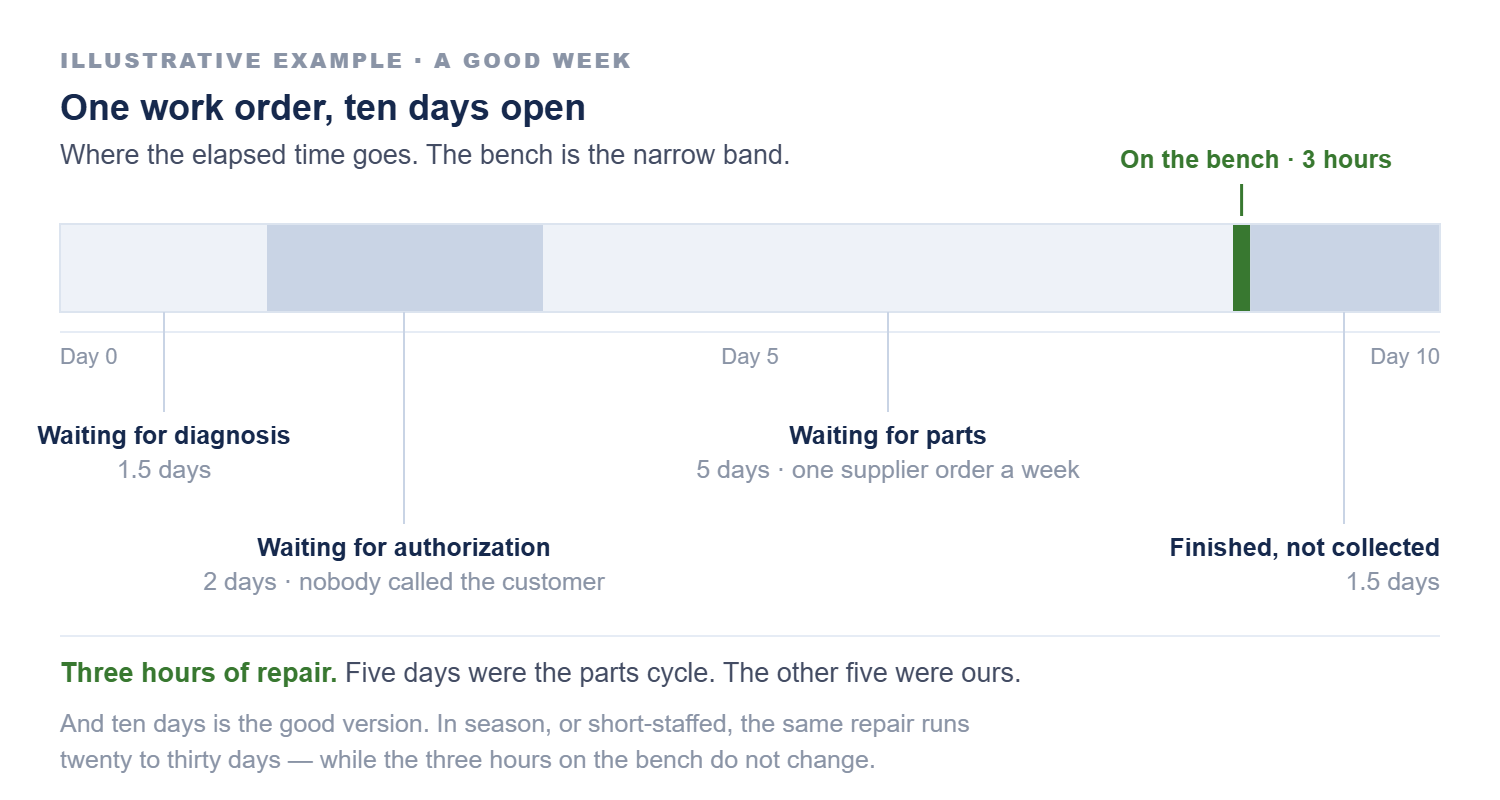
Where work tends to stop
Every shop develops its own patterns. They rarely show up in a standard open-work-order report, but they become obvious once you start paying attention to where jobs spend their time.
Where jobs wait, stage by stage
01
Diagnosis
Waiting for a technician to look at it at all.
02
Authorization
Diagnosed days ago, nobody has called the customer.
03
Parts
Waiting on a part — sometimes one that was never ordered.
04
Bench
Parts arrived days ago, job hasn’t gone back to a tech.
05
Delivery
Completed units waiting because nobody owns the call.
Four of these five stalls are ours, not the customer’s and not the supplier’s.
There’s a sixth pattern worth watching: too much work opened at once. A shop that writes more jobs than it can move creates its own backlog, and every one of those jobs starts aging on the day it opens.
This is not about pushing technicians harder
When a shop is backed up, the first assumption is often that technicians need to work faster. Usually that isn’t the issue.
A technician can’t repair a job waiting on authorization. They can’t install a part that hasn’t arrived. They can’t work efficiently when priorities change hourly or the next job isn’t ready for them.
Some of the largest gains in shop productivity come from removing the delays around the technician rather than asking the technician to produce more — faster authorization, better parts coordination, clearer priorities, better scheduling, more complete information before the job reaches the bench, and moving finished work out of the shop promptly.
The purpose is not to make anyone feel rushed. It is to make productive work easier to do.
Status is also a customer conversation
Customers are usually far more understanding about delays when they know what’s happening.
“Your repair is diagnosed and we’re waiting on the part. It’s expected Wednesday, and we’ll call you when it arrives.”
The repair isn’t happening any faster. But the customer now has confidence that you know where their machine stands, which is most of what they wanted in the first place.
Ask a better morning question
Instead of opening the day with “how many work orders do we have?” try: which ones are moving normally, and which ones need somebody to step in?
That changes where a manager’s attention goes. The goal is not to touch every job every day. It is to catch the jobs that need help before the customer is the one who tells you something went wrong.
A short stand-up huddle at the start of the day is usually the cheapest way to make that happen. Five or ten minutes on what’s stuck and who is waiting on what — not a walk through every open job.
The same idea travels well outside the shop. A special order has a next step. A sales quote has a next step. An accounting exception has a next step. A warranty claim has a next step. Any time something stays open, there should be a reason and an understanding of what happens next.
A work-order list tells you what is open. A production mindset tells you whether the work is actually moving.
How this connects
Area: Operations — service throughput and shop control.
Applies across: Revenue, Administration and Executive — service is a profit center, and it’s usually the one carrying the most upside.
Read next: Why More Reports Won’t Fix Your Month-End — what the same discipline looks like on a weekly calendar, and why it usually dies.
ProfitEdge Systems helps independent retailers and dealers improve profitability and operating performance through consulting, training, and intelligence tools. See how we help →

Free checklist
The Physical Inventory Planning Checklist
Two pages. Everything to do six weeks, two weeks and one week out, the count-day rules, and a review sheet that shows the gross variance, not just the net. One email address, nothing else.
Free follow-up kit
The Follow-Up Kit
Four printable pieces: a short huddle playbook for managers, the huddle form, a one-page field job aid, and a guide to turning the reports you already have into working lists. One email address, nothing else.
Free self-check
The Exit-Readiness Self-Check
Two pages. What still runs through you, the four questions a buyer or successor will ask, and a place to name your first three gaps. One email address, nothing else.
Free worksheet
The Shrink Investigation Worksheet
Two pages. A five-step check for every significant variance, an item log, where shortages hide in an equipment and hardware store, and how to spot a pattern before anyone is accused. One email address, nothing else.
Free self-check
The Small-Office Controls Self-Check
Two pages. Who does what on a payment, the five control activities, first fixes for a two-person office, and a login review. One email address, nothing else.
Free counter log
The Missed-Sale Log
Two pages. A counter log for every request you couldn’t fill, a weekly review that gives each signal an owner, and a place to track patterns across the month. One email address, nothing else.
Free account review
The Commercial Account Review
Two pages. A snapshot of your five most important commercial, fleet, municipal or farm accounts: what they run, the terms on file, and what each account really earns. One email address, nothing else.
Free planning sheet
The Before-the-PO Planning Sheet
Two pages. Why you’re buying it, four questions to answer before the cash goes out, the program on one page, and how to run a controlled test when the evidence is thin. One email address, nothing else.
Free template
The Customer Deposit Policy Template
Two pages. Write your deposit terms once, set how deposits are handled at the counter, and reconcile open deposits every month. One email address, nothing else.
Free worksheet
The Revenue Leak Worksheet
Two pages. Check warranty, co-op and programs, labor, vendor terms and floorplan, put a yearly dollar figure on each leak, and rank them against shrink with an owner for every fix. One email address, nothing else.
Free morning review
The Work Order Stage Review
Two pages. A morning sheet for every open job, with its stage, what it’s waiting on, the next step and who owns it, plus a stage-by-stage count of where work stalls. One email address, nothing else.
Free monthly review
Monthly Margin Questions
Two pages. The four questions an owner should be able to answer every month, set out as a sheet to fill in when the statement arrives, with a checklist of where margin drifts. One email address, nothing else.
Free planning sheet
The Decision-First Report Request
Two pages. Before asking for a new report or a new system, write down the decision, who makes it, how often, what counts as an exception and whether the data can be trusted. One email address, nothing else.
Free working sheet
The Month-End Exception Review
Two pages. The five questions worth settling before you build anything, and a daily / weekly / before-the-close sheet with the owner column left blank for your own names. One email address, nothing else.

Shrink Isn’t Only Theft
When the count comes up short, theft is the first thought. Often the stock was never there, or it left without anyone recording it. Sort the cause before you act.

Trust Is Not a Control
Controls are not a judgment about anyone. They are a judgment about whether one person could move money and hide it, and they protect the people you trust most.

Commercial and Fleet Customers Are Different
A down mower is a frustrating weekend for a homeowner. For a landscaper, it is a crew standing still.

Customer Deposits Aren’t Your Money Yet
A deposit is money you are holding, not money you have earned. Book it as a sale and the numbers start telling a story that is not true.
Bring the problem you keep re-solving
Most of what ends up in these articles started as a question from a shop owner or a dealer principal. If something here sounds like your month, say so and we will look at it together.
